Moving counter forms and waivers onto the customer's phone
Registration forms and signed statements on paper slow the busiest hour and bury the records. What changes when customers fill them in on their own phone.
It is ten in the morning in August and the boat leaves at half past. Eleven people are standing at the counter, each holding a pen and a clipboard. Two of them are filling in the wrong form. One family is waiting for the German version, which ran out yesterday. Someone at the back has asked three times whether the medical questions apply to him.
The forms get done, the boat leaves late, and the pile goes into a folder. In October someone needs to find one of those sheets, and the folder has to be read page by page, in handwriting that made sense to the person who wrote it.
This scene is not specific to diving. Rental shops, clinics, gyms, activity operators and anyone who needs a signed statement before the service starts live some version of it. The paper is not the problem on a quiet Tuesday. It becomes the problem at exactly the hour you have the least time for it.
What goes wrong with paper at the counter
Most of the trouble comes from the same few places:
- Everyone fills it in at the same moment. The queue forms at the counter because there is one counter, a handful of clipboards and a limited number of pens.
- One form has to cover every case. A beginner and an experienced customer get the same sheet, so both skip past sections that do not apply to them, and sometimes past ones that do.
- Handwriting has to be read twice. Once by staff at the counter, and again by whoever types it into the booking book or the computer later.
- The record lives in one place. A folder can be misplaced, soaked or thrown out with last season's boxes. There is no second copy unless someone makes one.
- Language runs out. You print the languages you expect, and the customers who arrive are the ones you did not.
What changes when the form is on their phone
The simplest version is a link or a QR code on the counter. The customer opens the form on their own phone, picks their language, and fills it in while they wait, or before they arrive. What that changes in practice:
- The queue spreads out. Eleven people can fill in eleven forms at once, because each of them is holding their own device.
- The form asks only what applies. Choose "first time" and you see the questions for a first-timer. Choose a different service and the form changes with it. Nobody reads a section meant for someone else.
- Required answers cannot be skipped. A paper form cannot stop someone from leaving the signature line empty. A digital one can.
- The record is legible and searchable. You find a customer by name or date in seconds instead of leafing through a folder.
- A backup copy exists by default. Every submission can be copied somewhere else the moment it is sent, so losing one place does not mean losing the records.
An example from a dive counter
We built this for Mykonos Diving Center in 2022. Every diver has to register and sign a medical and liability statement before going in the water, and the statement depends on the programme: a first-time dive asks different things from a dive for someone already certified. Customers now open the form on their own phone at the centre, choose one of six languages and their programme, and see only the questions and statements that apply, ending in a signature field.
Each submission is copied to Google Sheets as soon as it is sent, which gives the centre a plain backup it can open without us. A separate system holds the registrations with search, a calendar view, and charts of which programmes sell and when the busy periods fall.
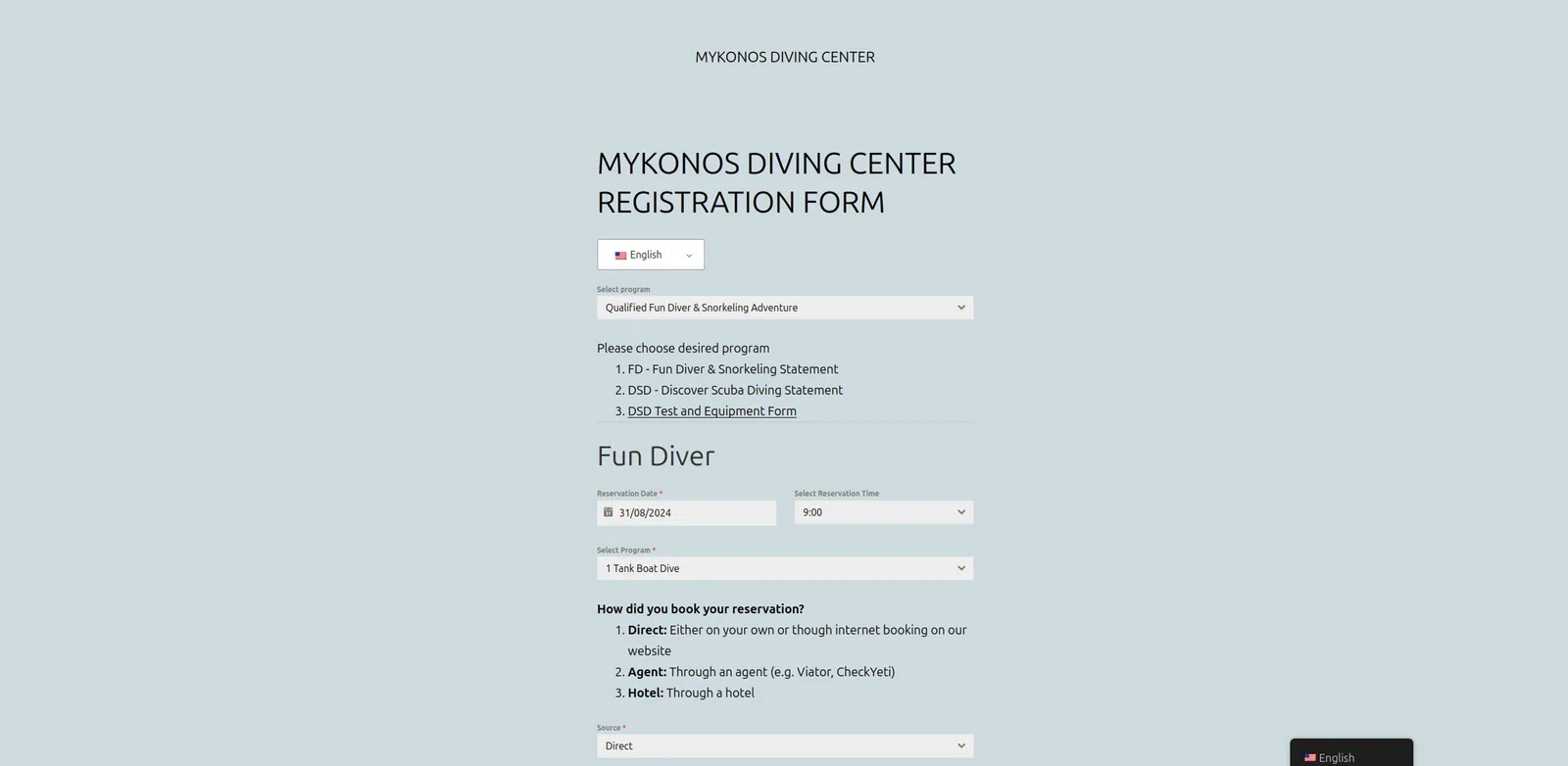 Mykonos Diving CenterRegistration and waivers signed on the customer's own phone
What it costs you to leave it on paper
We do not have a number for your business, and nobody else does either. But you can work it out with a few questions:
- On your busiest day, how long does the queue at the counter last, and how many people are standing in it?
- How often does a form come back incomplete, and who chases it?
- How long does it take to find a specific customer's signed statement from last season?
- How many hours go into typing paper forms into a computer afterwards?
If those answers are "not long", "rarely", "a minute" and "none", you probably do not need to change anything.
The honest version
A clipboard is fine for a lot of businesses. If you see a handful of customers a day, one language covers nearly all of them, and nobody ever needs to look a form up again, paper works and costs almost nothing. A printed form with a clear layout will do more for you than software you do not need.
There is also a middle step before a system built around it: a general-purpose online form builder with a signature field can take you a long way, and it is worth trying first if your form is the same for every customer.
One thing we cannot answer for you is the legal side. What a waiver, consent form or medical questionnaire must contain, how it has to be signed, and how long you have to keep it depends on your sector and on the rules that apply to you. Before you replace a paper signature, ask your lawyer or accountant what the electronic version needs to include. Then build the form to that.
Where to start
Take the forms your customers fill in today and lay them side by side. Mark every section that only applies to some customers, and every field staff regularly have to chase. That sheet of markings is most of the specification. If it turns out to be long, talk to us about it.